
Animation Cancelling means tool usage is much faster than usual, saving you the time in the day to tend to your farm, spend more time in the mines or catch that pesky legendary fish you have been looking for!
What is Animation Cancelling?
So what even is Animation Cancelling? You might ask. Well technically it is a game developer term or phrase that literally describes what it is, cancelling the current animation that is playing.
Basically, each tool when you use it is just an animation that plays when you press a button and at some point when you swing an axe, it hits a tree. Once the axe animation has hit the tree it then needs to return to the player. Animation Cancelling cuts this animation down to just the necessary part of hitting the tree and allowing you to then start another animation quicker than if you had to wait for the axe to return to the player after hitting said tree.
How is it done?
Animation Cancelling is a standard thing that everybody can do in Stardew Valley by just pressing the default keys that perform the Animation Cancel.
Simply press Right-Shift + Del + R.
Ok cool, but that is too hard to do while also moving the character and trying to keep my hand on the mouse!
Don’t worry, I got you!
Lets use a third party software to rebind those keys in game to something easier like the X key.
Step 1
Download AutoHotKey
Step 2
Once AutoHotKey is installed basically just close it all down including the tutorial window that should have popped up.
Step 3
Right Click with your mouse anywhere on your Desktop and navigate to New > AutoHotKey Script
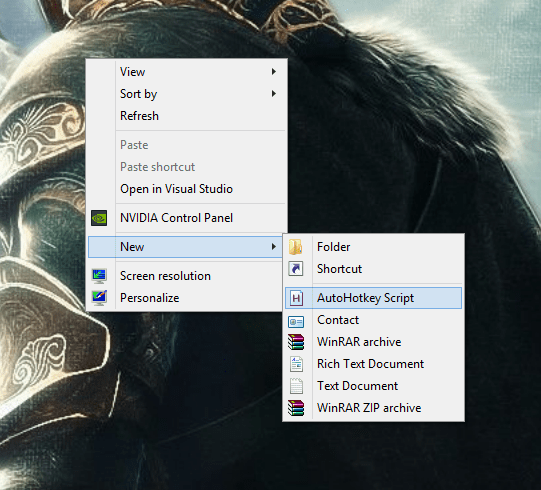
Step 4
Name it whatever you want, I named mine Stardew.ahk
Step 5
Right Click to Edit the script you just made, copy this script into the script you just made and save it
#IfWinActive Stardew Valley

x::

While GetKeyState("x","P")

{
 sendEvent {LButton Down}
 sleep 10
 sendEvent {LButton Up}
 sleep 125
 sendEvent {r Down}{Delete Down}{RShift Down}
 sleep 10
 sendEvent {r Up}{Delete Up}{RShift Up}
}

sleep 30

return
Step 6
Run the script by double clicking it, you should see a green H icon on your Taskbar.
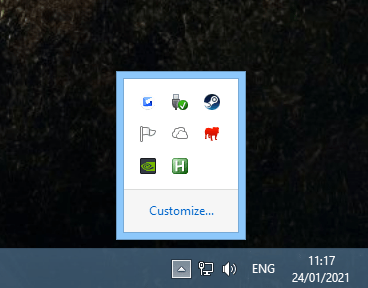
Step 7
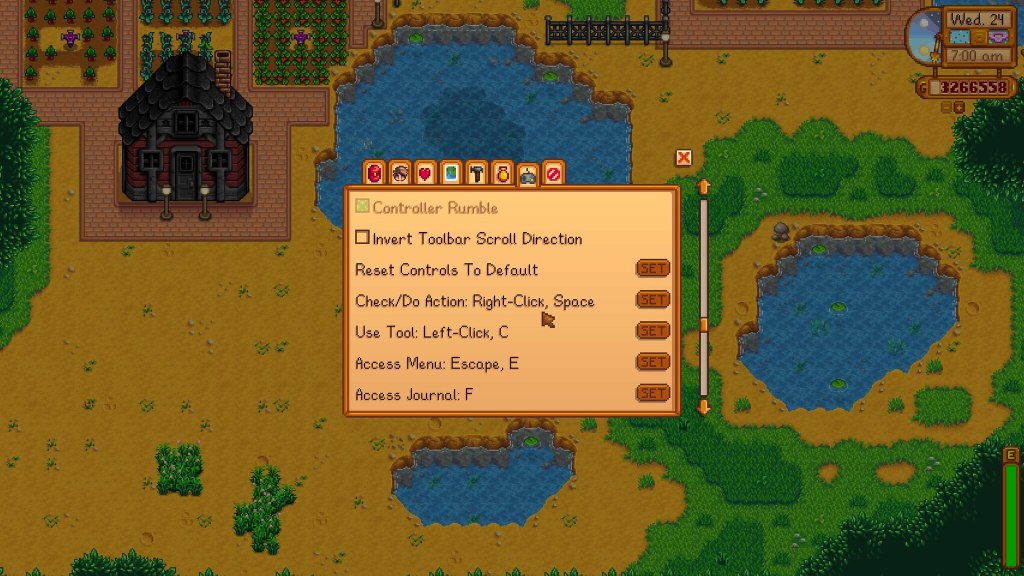
Run Stardew Valley, either start a new game or load a saved game. Technically you can now Animation Cancel but sometimes you can have issues as the X key by default is the Check/Do Action key so you really want to rebind the X key in Stardew Valleys options to something else like Spacebar. Other than that you can now enjoy faster tool usage by pressing or holding the X button.
Watch how it is done!

Donate to eQuiinox_67
Donate to the author of this post to help support them and the continued content creation. Even as little as £1 helps and is greatly appreciated!
£1.00
Subscribe to Humble Choice

New members that subscribe to Humble Choice pay just $12 and can keep all 12 games in the February Choice bundle shown above.
Subscribing to Humble Choice not only gives you over $250 worth of games each month but also gives you access to the Humble Trove, a library of 90+ DRM free games you can download and keep forever with new titles added every month.
Subscribers to Humble Choice also get up to 20% discount on thousands of games on the Humble Store. This includes new releases and limited-time sales! Best of all, both charities and developers are paid exactly the same as if you paid full price!

Everything sold via the Humble Bundle website including bundles, Store products to Humble Choice, all help to support the supported charities.
Each month 5% of the cost of a Humble Choice subscription is donated to the featured charity of the month.
This month, we are proudly supporting Gameheads.
 equiinox.com